

Two Easy Ways to Start Earning Rewards!
Become a member today! Members-only pricing and offers, personalized care notifications, Vital Care points back on every purchase and more!
 Become a credit card member today!
Earn 2X Pals Rewards points at Petco
when you use Petco Pay!APPLY NOWLearn More About Petco Pay Benefits
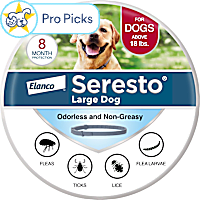
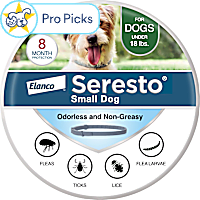
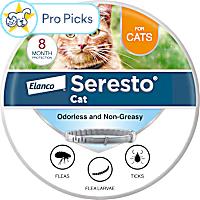
Seresto
Get It Today



Related Searches
Related Articles & Questions
- Home & Habitat
Sustainable Dog Accessories & Eco Pet Parenting Guide
Being a sustainable pet parent involves good practices and habits. Learn more about eco-friendly dog products, eco-friendly cat products and other solutions.
Updated on June 19th, 2026
 Health & Wellbeing
Unlock Optimal Health: Best Pet Supplements for Your Dog & Cat
Discover how to choose the best supplements for your pet’s health, from essential vitamins to joint support and digestion aids. Learn age-specific and seasonal supplement tips for cats and dogs.
Updated on June 19th, 2026
- Health & Wellbeing
How Long After Pest Control Is It Safe for Pets?
You may have heard that flea and tick prevention are crucial for dogs and cats, but do you know why? Petco is sharing why and how to prioritize pest prevention for your pet.
Updated on June 19th, 2026
- Health & Wellbeing
Fish Oil for Dogs: Benefits, Dosage, & Our Top Supplement Picks
Learn about the benefits of fish oil for dogs. Order online from Petco and save with Autoship or Curbside Pickup.
Updated on June 19th, 2026
- Health & Wellbeing
Protect Your Pet: Flea & Tick Control Solutions for Dogs & Cats
Learn how to remove flea and ticks. Petco has flea and tick removal services for dogs and cats. Get fleas and ticks removed at your neighborhood Petco.
Updated on April 9th, 2026
- Vet Q & A
My dog has flea/fly allergies. Is Seresto better than Hartz collar?
Seresto is a very good product and in my experience would work best. Otherwise it seems you are doing everything Nina needs. Benadryl and any other medication you are giving should be ideally supervised by your veterinarian. Hope that answers your questions, if not please contact us again!
Updated on September 24th, 2025
- Vet Q & A
How do I get pet food and supplies delivered automatically by Petco?
**How does Autoship work?** ---------------------------------- - Get your everyday pet essentials delivered right to your door at the guaranteed lowest online price, you can save up to 20% off and free shipping on every qualifying order! - Autoship lets you schedule your favorite pet food and supplies for automatic delivery. No more last minute trips to the store - Autoship will ship your pet essentials right to your door. - All the products your pet needs on a regular basis are available. Choose from food, pest control, medications, vitamins, supplements and much more for all pet types. **What types of products are available?** ----------------------------------------- - **Dogs:** A variety of dry and canned dog food formulas, treats, pest control, vitamins and supplements, medications, waste pickup bags, select toys - **Cats:** A variety of dry and canned cat food formulas, treats, litter, litter box liners, litter odor control, catnip, pest control, vitamins and supplements, medications, calming aids, select toys - **Fish:** A variety of fish food, sea salt, water conditioners, vacation feeders, vitamins and supplements, medications, water tests, filter cartridges - **Small Animals:** A variety of foods, treats, bedding and litter, hay and grass, vitamins and supplements, maintenance supplies - **Reptiles & Amphibians:** A variety of prepared and live food, vitamins/supplements, medications, sand and substrate, filter media, maintenance supplies - **Birds:** A variety of foods, treats, vitamins/supplements, medications, habitat litter and liners, nesting materials, select toys **How do I set-up a Autoship?** -------------------------------------- - Browse [petco.com](http://petco.com/) for the items you want to schedule for Autoship - Enter the quantity of each item you want and click the button. - Fill out the "Set Your Schedule" form - Click the "Review Cart" button - Review your cart and proceed to Checkout to complete your subscription setup ### *Note: Items will not ship until the first shipment date you set. You will not be charged until your order ships.* **How do I add a new item to my subscription?** ----------------------------------------------- - On the product page, enter the quantity of the items you want. - Click on "Schedule Autoship" - Sign in to Your Account to add to the new item to an existing Autoship subscription or create a new subscription. - Confirm your order details, then click "Schedule" ### *Note: You must complete the Checkout process to add new items to your Autoship subscription. The items will be shipped with your next Autoship order. Some items cannot be added to a Autoship order. You will be notified of this at Checkout.* **How do I add one-time items to my Autoship?** ------------------------------------------------------ **If you are signed in:** ------------------------- - View the product page - Choose to add the product once to your upcoming order - Confirm your decision - That's it! You'll receive the product with your next order. **If you are not signed in:** - If you are not signed in, select to add the product on to your upcoming order - You will be asked to sign in - Confirm decision - That's it! You'll receive the product with your next order ### *Note: Receive free shipping on all of your repeat deliver orders. If you add a one-time item to you upcoming Autoship order, that will ship for free too! If multiple orders, you can choose which order to ship your product.* **How do I edit my Autoship schedule?** ---------------------------------------------- 1. Sign into your [petco.com](http://petco.com/) account 2. In the "Autoship" section, select the subscription you wish to modify 3. On the Update Autoship page, you can change: your shipping address, payment method, quantities, delivery frequency, next ship date; or delete your Autoship Schedule 4. Click "Update Schedule" to save any changes **How do I apply my Petco Perks Dollars to my Autoship order?** ----------------------------------------------------------------------- - For new Autoship customers: You are given the option to apply your Petco Perks Dollars when you schedule your first shipment. Simply check the box labeled "Apply all my available Petco Perks Dollars." - For existing Autoship customers: Log into your account and in the "Account Name & Delivery Options" section, check the box labeled "Apply all my available Petco Perks Dollars" then "Update Schedule" - By checking this box, whenever a scheduled Autoship order is being created for shipment, all available Petco Perks Dollars will automatically be applied in $5 increments (For example, 15 Reward Dollars applied to a $14 order will result in a $4 order charge with 5 Reward Dollars remaining for future use) You can opt-out anytime by logging into your Autoship account and deselecting the same box **How do I edit my Autoship schedule?** ---------------------------------------------- - Sign into your [petco.com](http://petco.com/) account. - In the "Autoship" section, select the subscription you wish to modify - On the Update Autoship page, you can change: your shipping address, payment method, quantities, delivery frequency, next ship date; or delete your Autoship Schedule. - Click "Update Schedule" to save any changes ### *Note: You can change any part of your Autoship subscription up to three days before your order is scheduled to ship.* **Can I apply additional promotions to my Autoship?** ------------------------------------------------------------ - Since Autoship Subscribers enjoy our lowest online everyday prices on food and great limited-time offers on supplies, most Petco promotional offers do not apply to Autoship orders. Please read each promotion's Terms and Conditions to see if the offer can be applied to your Autoship. - Free shipping is limited to items that are eligible for Autoship
Updated on September 24th, 2025
- Vet Q & A
What tick prevention for dog on Advantage Multi, allergic to Seresto?
Great question! There are so many products it can be hard to navigate. If you are already using advantage multi for fleas and heart worm prevention there are several options you could add in for tick control. If you like collars you could try the Preventic collar (different ingredients than seresto). https://m.drsfostersmith.com/product/prod_display.cfm?pcatid=1254 Alternatively you could discuss using one of the oral flea and tick preventatives (nexgard or simparica) staggered 2 weeks from the advantage multi. https://m.drsfostersmith.com/product/prod_display.cfm?c=9547+29385+28648&pcatid=28648
Updated on September 24th, 2025
- Vet Q & A
Can I use Seresto collar with Advantage or Frontline for my dog?
It is ok to use Seresto along with other topical products, just not oral ones. In some pets there can be a little skin irritation, so watch out for that and notify your vet if this happens. Otherwise, you should be fine to go ahead with Seresto to see if this does the trick. I would also recommend using a flea fogger to treat your home, which can be found at your local Home Depot or Lowe's. If you still don't have good results with the Seresto collar, then I would wait at least 2 weeks and consider better products such as Simparica or Nexgard. Best of luck with your flea issue and Nova moving forward. Take care!
Updated on September 24th, 2025
- Vet Q & A
Seresto isn't working. Can I use Frontline or oral flea meds too?
Please do not feed garlic to your dog, it can cause blood disease in dogs! Here are instructions for flea prevention: Unfortunately fleas only hop on the body of your pet when they want to feed, then they hop off again and stay in your pet's environment. So you need to treat all pets in the household as well as the environment (which contains the fleas, their eggs and larvae). Flea treatment: 1) Get some flea medication such as a Flea spray or a spot on from a pet shop or your veterinarian and apply monthly 2) get flea powder, put some in your vacuum cleaner bag and vacuum your house and furniture and also non-carpeted areas frequently to remove flea larvae and eggs which live off house dust., Dispose of the bag in the trash outside. Hot-wash all the pet's bedding, If you do this diligently for a few months you will get rid of the fleas. Flea products: Spot-ons and/or chews Advantage, Advantix Advantage Multi (Advocate in the UK) Frontline (ticks as well) Bravecto spot on (ticks as well) - for cats, in tablet form for dogs Simparica, Nexgard Revolution (stronghold in the UK) Tablets: comfortis (will only kill fleas once) Collar: Seresto (ticks as well)
Updated on September 24th, 2025